A WhatsApp reminder for
every cart left behind
In every plan, from Starter up
When a shopper leaves items in the cart, WAPI Connect Pro sends a WhatsApp reminder with a link that brings the cart back. You see the sales the reminders brought.
Find it in WAPI Connect → Abandoned carts.
- Saves the cart with the customer’s phone number and consent, straight from WooCommerce
- Up to three reminders, each after the wait you choose, from 15 minutes to 72 hours
- The link fills the cart again and opens checkout
- Stops the moment the customer buys, checked again right before each message goes out
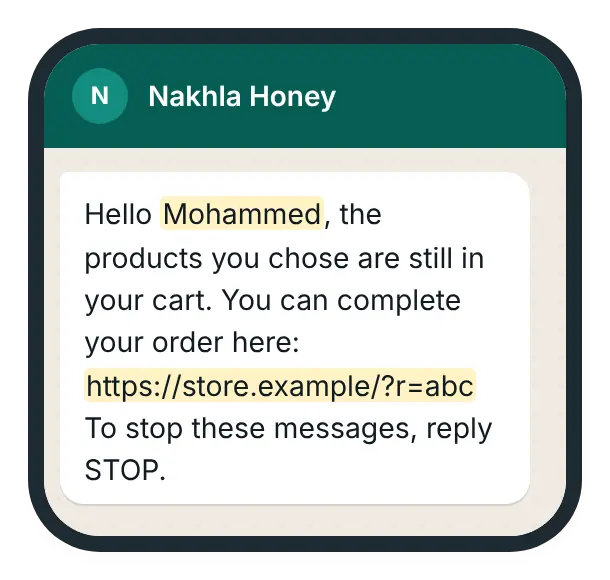
What your customer gets on WhatsApp
What you see in WordPress

How it works
Once, in WordPress: turn on reminders and choose the template and the wait (Settings → Abandoned Cart). Then, for every cart left behind:
A shopper leaves the cart
A shopper who agreed to messages leaves items in the cart.
Your reminder goes out
After the wait you choose (15 minutes to 72 hours) they get your WhatsApp reminder with a link that fills the cart again. Up to three reminders, stopping the moment they buy.
You see what it sold
The Abandoned carts screen shows who bought after a reminder and the sales it brought.
Where each cart stands
The cart is saved when the shopper types a phone number on the checkout page, signs in with a WhatsApp code, or is signed in with a phone number on their account. With WooCommerce’s newer block checkout, only the last two save the cart (see the questions below). The plugin checks the waiting carts every few minutes, and the link puts the items back in the cart and opens checkout.
On the Abandoned carts screen, each cart moves from one stage to the next, up to “Bought after the reminder”.
What you see in WordPress

Up to three reminders, one after another
First reminder
After the wait you choose, from 15 minutes to 72 hours
Your template, with the customer’s name and a link back to the cart.
Second reminder
Only after the first
Its own wait and its own template, for example a friendly first reminder and a discount in the second.
Third reminder
Only after the second
The last reminder, with its own wait and its own template.
Rules that keep reminders polite
All of them are in Settings → Abandoned Cart.
Only customers who agreed
With “Require WhatsApp consent” on, carts without consent are skipped. Turn it on: Meta asks for opt-in before marketing messages.
One, two or three reminders
Switch each reminder on or off, give it its own template, or choose “Send only once per cart”.
Minimum cart total
Skip carts below the amount you set, so small carts do not cost you Meta messages.
A weekly cap per number
“Maximum messages (7 days)” limits how many reminders one phone number can get in a week (3 by default).
Links that expire
The recovery link stops working after the days you choose (7 by default), and old cart records are deleted after the days you set (30 by default).
Works when WP-Cron is late
The check also runs when you open the admin or when WhatsApp sends a message. The screen shows when it last ran and, when it runs late, the cron command for your host.
Want to add a discount?
The plugin fills two blanks in your template: the customer’s name and the link back to the cart. To offer a discount, write the code into the template text, after you create the coupon in WooCommerce → Coupons.
Each reminder can use a different template, for example a friendly first reminder and a discount in the second.
First reminder
Hello Sara, your cart is still saved. You can finish your order here: yourstore.com/cart
Second reminder, with a discount code
Sara, still thinking? Use the code BACK10 for 10% off today: yourstore.com/cart
What you need
- An approved Marketing template with two blanks, made in WAPI Connect → Templates (the “Cart reminder” starting point) or in WhatsApp Manager:
{{1}}the customer’s name and{{2}}the link back to the cart - Customers who agreed to WhatsApp messages; the plugin adds a consent checkbox to WooCommerce’s classic checkout page
- WordPress scheduled tasks (WP-Cron), or better, a real cron job on your host
- Any plan, from Starter up
What it costs
To us
Included in every plan, from $55/year (≈ 17 KD).
To Meta
Each delivered reminder is a marketing message. Meta bills your own WhatsApp account at its rate for the customer’s country (as of 17 October 2026).
Meta’s limits
Meta limits how many marketing messages one person receives, so some reminders may not be delivered. The screen counts failed messages.
Meta’s rates are on its pricing page.
What Meta decides about cart reminders
As of 17 October 2026. A cart reminder is a marketing message in Meta’s WhatsApp Cloud API.
- Meta asks for the customer’s agreement before marketing messages, so keep “Require WhatsApp consent” on
- Each delivered reminder is a marketing message, billed by Meta at its rate for the customer’s country
- Meta limits how many marketing messages one person receives, so some reminders may not be delivered
- Read more in privacy and consent
Questions about cart reminders
Will a customer who already bought get a reminder?
No. When an order arrives, the plugin closes every open cart of that customer: by phone number, e-mail and account. It checks again right before a reminder is sent, even if the reminder was already waiting in the queue.
How do you count the sales from reminders?
A cart counts as “Bought after the reminder” when the customer orders within 7 days after a reminder was sent or its link was opened. A purchase without a reminder is not counted, and an order still waiting for payment does not close the cart.
What recovery rate can I expect?
We do not promise one: it depends on your store, your prices and your message. The screen shows your own numbers: sales from reminders, carts bought after a reminder, the buy rate and the links opened.
Which checkout pages does it work with?
On WooCommerce’s classic checkout page, the cart is saved as soon as the shopper types a phone number. With other checkouts, carts are saved for shoppers who are signed in with a phone number on their account or who signed in with a WhatsApp code.
Can I test it before customers get it?
Yes. On the Abandoned carts screen, “More tools” → “Create a test cart”, then “Send now” on that cart. “Run the check now” runs the reminder check at once.
Do I need another abandoned-cart plugin?
No. The plugin saves the carts, creates the recovery links and sends the reminders by itself.
Start bringing carts back
Cart reminders are in every plan, from Starter up.