Everything your store does on WhatsApp, in one plugin
Plugin 2.10.0 · Arabic and English
Every feature of WAPI Connect Pro, grouped by your customer’s journey: attract, convert, serve, keep and stay safe. The label under each feature is the smallest plan that includes it.
- Uses Meta’s official WhatsApp Cloud API
- No fee from us on messages
- Lives inside your WordPress dashboard
- Every screen in Arabic and English
Start conversations with customers who want to hear from you
Offers go only to customers who agreed to get them, and a click on your ad, link or QR code opens a chat that answers by itself.
Campaigns
Business plan and upYou send an offer to the customers who agreed, with a picture, a coupon or a link button, and the report shows who got it, read it and replied.
See campaignsContacts
Business plan and upCustomers agree to offers at checkout, on the WhatsApp login form or in a chat, and Contacts keep that record. You can also sync customers from your store, or import Excel or CSV.
See contactsChats from ads, links and QR codes
Pro plan and upA customer taps your click-to-WhatsApp ad, a link or a QR code, and an automation answers the chat that opens.
Explore automations
What your customer gets on WhatsApp

Turn visits into paid orders
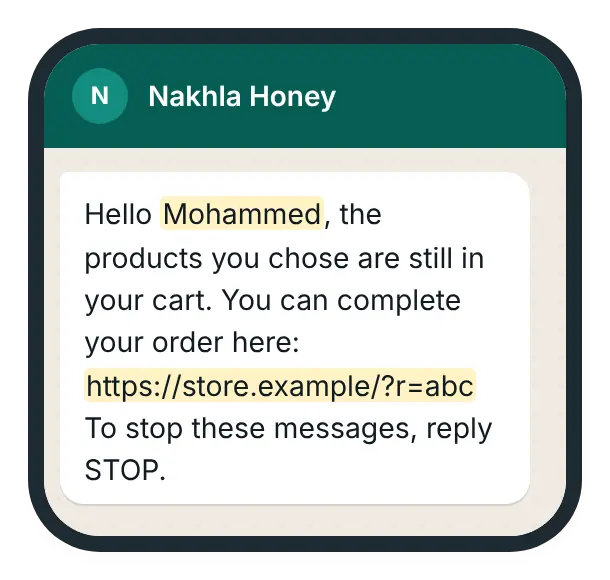
A shopper who leaves a cart is reminded, customers sign in with a code on WhatsApp, and products sell inside the chat.
Abandoned-cart reminders
Every planA shopper leaves items in the cart, and gets up to three WhatsApp reminders with a link back to it. The Abandoned carts screen shows the sales the reminders brought.
See cart remindersWhatsApp login code
Every planA customer signs in or checks out with a code that arrives on WhatsApp: on your login page, before checkout or from a Buy now button.
See WhatsApp loginProducts with Buy now
Pro plan and upA customer asks about your products in the chat, and gets them with a Buy now button that opens checkout, or the product page when there is an option to choose.
Explore automations
What your customer gets on WhatsApp
Answer every customer, even when you are busy
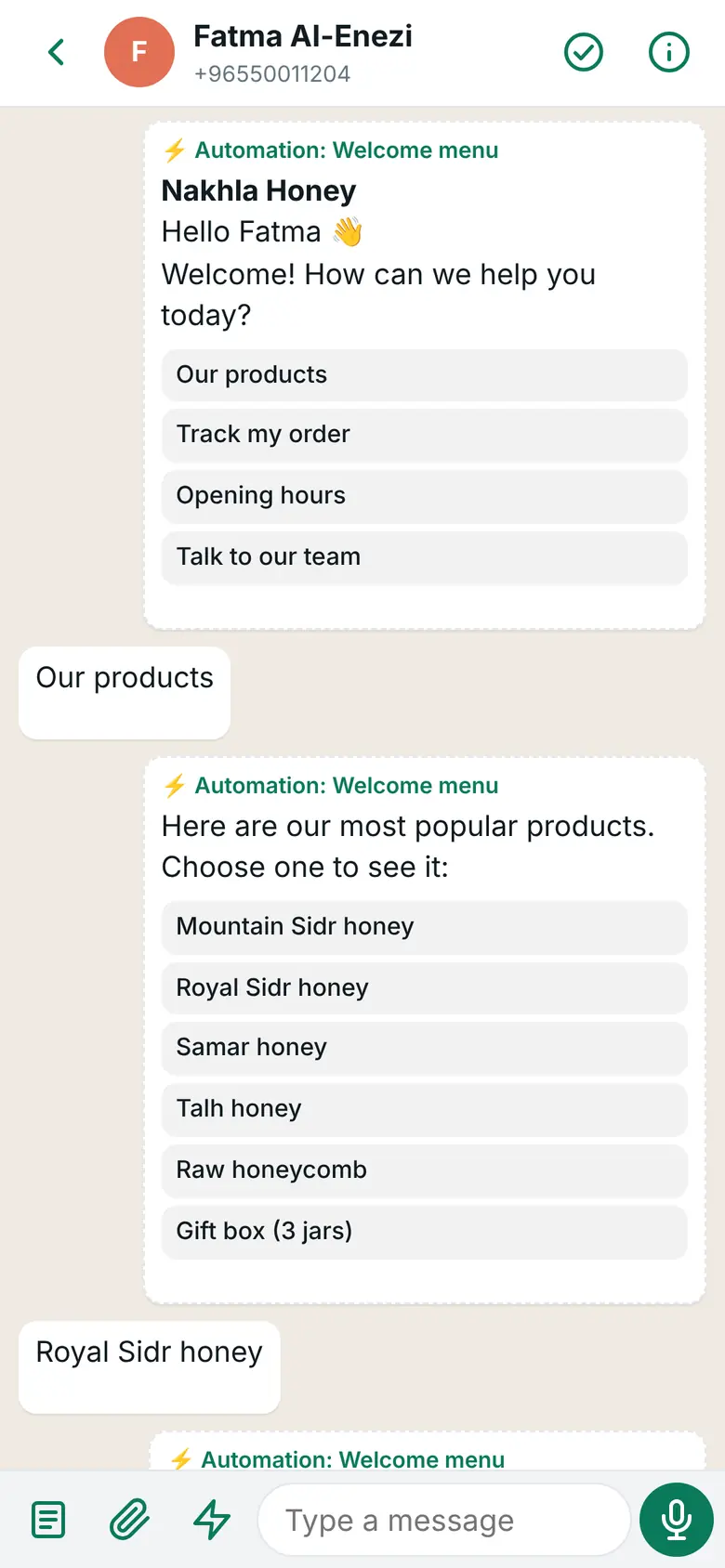
A customer writes, an automation answers first, and you take over from your phone whenever you need to.
Automations
Pro plan and upA customer writes, and the automation answers first: a menu with buttons, questions, your products or the status of their orders.
Explore automationsInbox app for iPhone and Android
Pro plan and upThe customer asks for a person, so your phone gets a notification. You answer from the inbox app, with saved replies and their orders beside the chat.
See the inbox appCalls log
Pro plan and upA customer calls your WhatsApp number, and the call shows in their chat. A missed call sends a notification to your phone, and a voicemail arrives in the chat.
See the calls logAI replies
Business plan and upA customer asks about your store or products, and the AI step answers with your own key, handing the chat to a person when needed.
How AI replies work
What you see on your phone
Keep customers informed after they buy
The order’s status changes and the customer hears from you; a new order arrives and you hear about it.
Order messages
Every planYou change an order’s status in WooCommerce, and the customer gets your WhatsApp message for that status, with the tracking number filled in.
How order messages workNew-order alert
Every planA new order arrives, and you get an alert on your own WhatsApp with the order number, total and payment method.
See the new-order alertMessage templates
Every planYou write a message template in WordPress, in Arabic and English, and send it to Meta for review. Once Meta approves it, “Use for” puts it into order messages, cart reminders or the login code.
See message templatesDone and rating
Pro plan and upYou mark a chat as done, and the customer can rate it with three buttons.
See done and ratingStop offers for one customer
Pro plan and upA customer asks for no more offers. You tap “Stop marketing messages” in their chat, and the change is saved with your name and the date.
See the inbox app
What your customer gets on WhatsApp

Catch problems before they cost you sales
When something stops working between your site and WhatsApp, the plugin shows what is wrong and what to do.
Account health
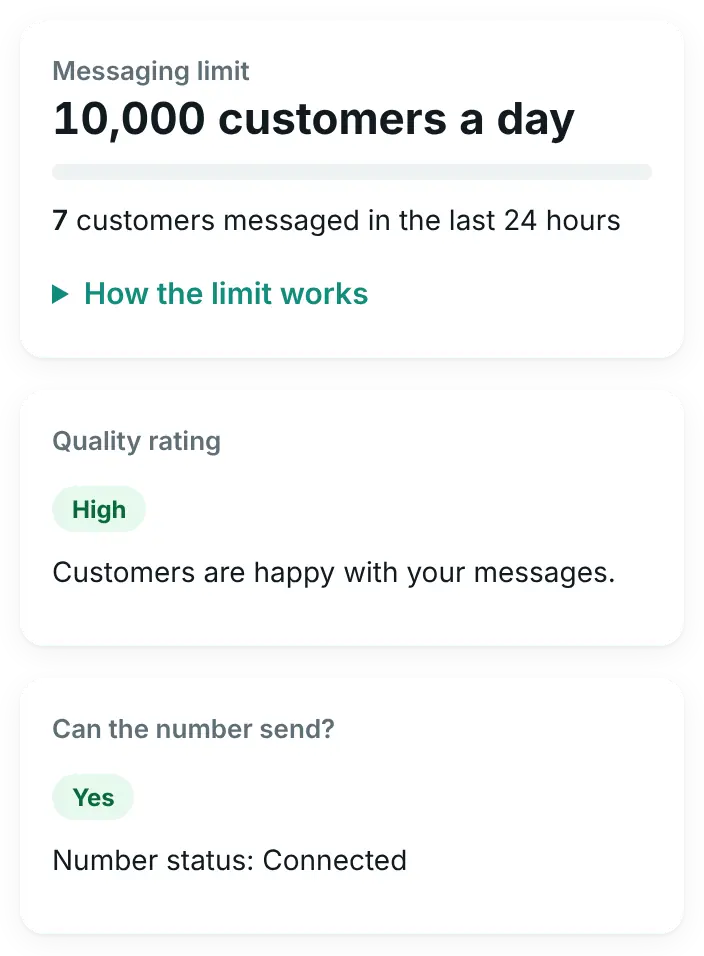
Every planMeta lowers your messaging limit or pauses a template, and you get an e-mail and a banner on the plugin screens. The screen shows your limit, quality rating and costs.
See account healthConnection Doctor
Every planSomething breaks between your site and WhatsApp, and Connection Doctor shows what is wrong in plain words. Common problems are fixed in one click.
See the Connection DoctorCampaign safety
Business plan and upA payment, account or template problem would make every next message fail, so the campaign pauses by itself. The wizard warns you before you pass today’s limit.
See campaign safety
What Meta knows about your number
Every screen in Arabic or English, your choice
Your screens and your customers’ language are two separate choices, both in Settings → General.
- “Plugin language (your screens)”: Arabic, English, or “Same as WordPress”. Arabic screens read right to left.
- “Customer language”: the language of the WhatsApp login page and the checkout text your customers see.
- The two are separate: Arabic screens for you and English for your customers, or the other way round.
- With Arabic screens, the Order messages screen shows WooCommerce’s order statuses in Arabic, even when WooCommerce itself is in English.
- The inbox app on your phone follows the same choice.
What we don’t do (yet)
Better you hear it from us now than find out after you buy.
- Answering WhatsApp calls inside the app. Calls are logged in the customer’s chat, with a missed-call alert and the voicemail link. Answering is coming later.
- Flow (form) buttons, voice-call buttons, and catalog or multi-product messages. Templates with these are not included in 2.10.0. Text, media, location, carousel and limited-time-offer templates are built in the Templates screen.
- Your agency’s name on the plugin. Selling the plugin under your agency’s own name and logo is coming later. Today you can put your store’s logo, colours and texts on the customer login page.
- Keeping your number in the WhatsApp Business app at the same time. The plugin runs the number on Meta’s Cloud API through your own Meta app, so it leaves the app on your phone. Keeping both at once (Meta calls it coexistence, offered only through some of Meta’s partners) is not offered by the plugin. Chats are answered from the inbox app (Pro plan).
Missing something your store needs? Tell us on WhatsApp
Pick the plan that fits your store
Starter covers order messages, the Templates screen, login codes, cart reminders and account health. Pro adds the inbox app, calls log and automations. Business adds campaigns, contacts and AI replies.