Give every client store professional WhatsApp, with one license for five sites
Agency plan · 5 sites
Set up order messages, an inbox app, automations and campaigns on your clients’ WooCommerce stores. Connection Doctor and account health show what is wrong, so a support call takes less of your time.
- Five client WooCommerce sites on one license
- Connection Doctor shows what is wrong with a setup
- Account health reads Meta’s limit and quality
- Each team member sees the plugin in their own language
What you see on each client site
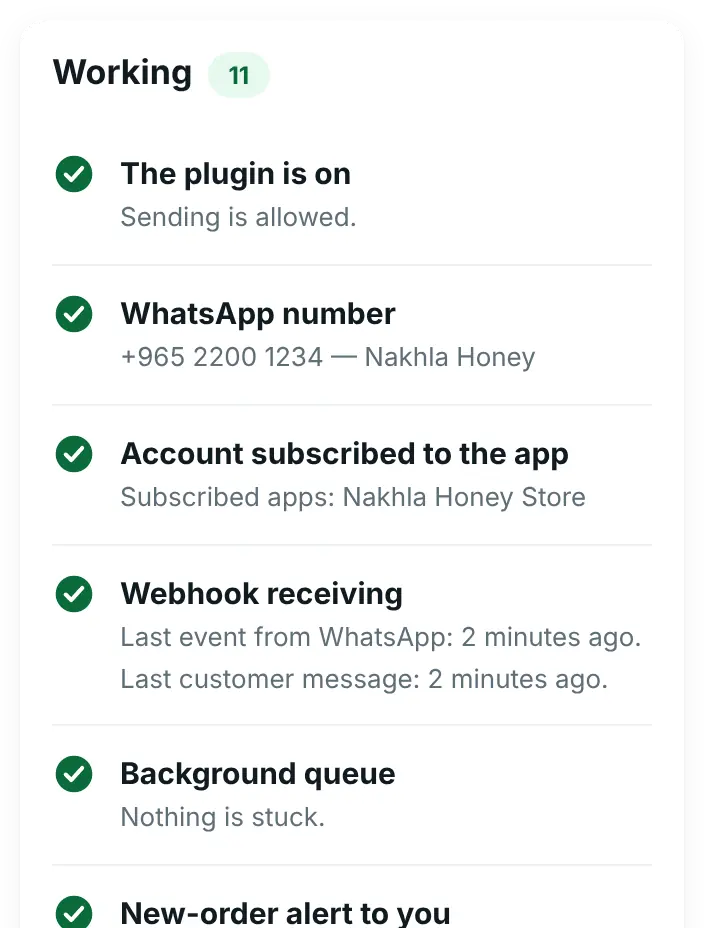
What one Agency license shows

Sound familiar?
What agencies and freelance developers tell us about WhatsApp projects.
“Every client’s Meta setup is a little different.”
Apps, tokens, webhooks and numbers. Miss one step and messages quietly stop.
“‘WhatsApp stopped working’ calls take hours.”
Is it the token, the webhook, the template or Meta’s limit? Finding out is unpaid time.
“The client wants Arabic, my team works in English.”
When the screens speak one language only, someone on the project ends up guessing.
Something you can hand over to a client
Nasma Flowers, a client’s flower shop, switched on the ready Order tracking automation with its own words. A customer asks where the order is, and the answer comes from WooCommerce with nobody typing.
- Words such as “my order” or «وين طلبي» start the automation
- It sends the status, total and date of the customer’s latest orders
- “Talk to our team” is one tap away if something is not clear
- The client sees the chat in the inbox app on their phone
Customer
Where is my order?
Nasma Flowers · Order tracking
Your latest orders: 🧾 #873 · Out for delivery · 18.000 KD · 17 October 2026
Nasma Flowers
Is everything clear?
Yes, thank you
Talk to our team
Customer
Yes, thank you
Nasma Flowers
You are welcome! 🌷
Four moments where it saves you time
The plan name shows the smallest plan that includes it. The Agency plan includes all of them.
A new client store
Agency planActivate the key in WAPI Connect → Settings → License. The panel shows the plan and “Sites”, for example 2 of 5. “Deactivate on this site” frees a place for the next client.
“WhatsApp stopped working”
In every plan, from Starter upConnection Doctor checks the connection details, the number, whether Meta sends customer messages to the app and to this store, the App Secret, stuck messages and failed messages by reason. “Subscribe now”, “Send them to this store” and “Run them now” fix common problems in one click.
Meta lowers a limit or pauses a template
In every plan, from Starter upAccount health reads the messaging limit, quality, costs and template problems from the client’s own account. Bad news goes by e-mail to the site’s admin address and, with Pro, to the inbox app.
The client reads Arabic, your team English
In every plan, from Starter upSet “Plugin language (your screens)” to “Same as WordPress”, and each person sees the plugin in the language of their own WordPress profile. “Customer language” is a separate setting.
What each client store gets
The Agency plan is everything in Business, on each of 5 sites.
Order messages
In every plan, from Starter upA template for each order status, the new-order alert, login codes and cart reminders.
Connection Doctor and account health
In every plan, from Starter upThe setup checks and Meta’s view of the account, together under Health & tools on each site.
Inbox app
Pro plan and upThe client answers from their phone, with saved replies and the customer’s orders.
Automations
Pro plan and upReady ones to start from: welcome menu, order tracking, outside working hours and customers from ads.
Campaigns and contacts
Business plan and upCampaigns to customers who agreed, with a clear report, contacts and a consent log.
AI replies
Business plan and upAnswers about the store and its products with the client’s own AI key, handing over to a person when needed. It cannot see orders; the “Customer’s orders” step shows them.
Create the Meta app in each client’s own business portfolio
- The Meta app and the WhatsApp Business account belong in the client’s own Meta business portfolio, with the client’s payment method for Meta’s charges
- An app in your agency’s portfolio cannot manage a client’s WhatsApp account without Meta’s Tech Provider access; Meta answers with a permission error
- The client keeps the number, the app and the chats if you part ways. Chats are stored on the client’s own site
- Connection Doctor confirms each link before you hand the store over
Rather not do it for every client? The setup service does it on the client’s own Meta account, for $99 (≈ 30 KD) once per store.
Agency: everything in Business, on 5 sites
$419/year (≈ 129 KD) for five sites, paid once a year.
Agency
$419/year (≈ 129 KD)
For five sites.
Suggested
- Everything in Business on each site: order messages, inbox app, automations, campaigns, contacts and AI replies
- Priority support: your tickets are answered first, with no promised response time
- Each client’s license renews yearly; a 14-day grace period follows the end date before the WhatsApp features pause
Business
$209/year (≈ 64 KD)
For one store.
One store only?
- The same features as Agency, on one site
- Priority support, the same as Agency
For developers
Small things that make looking after several stores easier.
- The code is GPL v2 or later.
- The
amwca_inbox_capabilityfilter sets who may use the inbox app (manage_optionsby default). - The
amwca_account_alert_emailfilter sends account alerts to another address, such as your support inbox. - Updates arrive in the normal WordPress Plugins screen while the license is active.
- “Emergency Disable” in Settings → General stops every outgoing WhatsApp message at once.
- The Message log lists each message and its result, and WordPress’s personal-data export and erase tools include the plugin’s contact, chat and automation data.
The plugin’s screens show the WAPI Connect Pro name. Settings → Branding puts the client’s logo, colours and titles on the WhatsApp login form that customers see, and nothing more. White label for the admin screens may come later; we will not sell it before it exists.
Good to know
Meta facts as of 17 October 2026.
Each store’s WhatsApp account pays Meta per message, at Meta’s rate for the customer’s country. We add nothing, and nothing passes through your agency or us.
Business verification can take days, and each template is reviewed by Meta, usually in a few minutes and up to 24 hours. New accounts start with a low daily limit on chats the business starts (250 customers a day at the time of writing), which grows with verification and good quality.
WAPI Connect Pro uses Meta’s official WhatsApp Cloud API. It is not made by Meta and gives your agency no special status with Meta.
Questions from agencies
Can I use one Meta app for all my clients?
Not with this setup. Create the app inside each client’s own Meta business portfolio. An app in your agency’s portfolio needs Meta’s Tech Provider access to manage other businesses’ WhatsApp accounts.
What happens on a sixth site?
The key will not activate there: the plugin says the license is already used on all the sites it allows. Deactivate it on a site you no longer look after, or buy another license.
Is white label included?
No. The admin screens show the WAPI Connect Pro name. Only the customer’s WhatsApp login form takes the client’s logo, colours and titles. White label may come later.
Can the client’s staff use the inbox app without being administrators?
By default the inbox app needs a WordPress administrator account. A developer can change that with the amwca_inbox_capability filter.
Where do the client’s chats live?
In the client’s own WordPress database, on their own server. They do not pass through our site.
Offer WhatsApp to your WooCommerce clients
Buy the Agency plan today, or ask us anything first.