Booking confirmations on WhatsApp
and instant answers to common questions, so your front desk can breathe
Suggested plan: Starter or Pro
For salons, personal trainers, tutors and consultants who sell sessions, packages or classes as WooCommerce products. The customer gets your confirmation when the order is paid, and your WhatsApp menu answers the questions you hear every day.
- A confirmation from your own template when the order is paid
- A menu that answers the questions you hear every day (Pro)
- Saves the day and time that suit the customer (Pro)
- Hands the chat to your team when they want a person (Pro)
What your customer gets on WhatsApp

What you set once in WordPress
Sound familiar?
What people who sell their time tell us.
“Did my booking go through?”
Customers pay, then write or call to make sure you got it.
“Where are you, how much, is there parking?”
The same questions arrive all day, and each one needs someone to stop and type.
“I’m with a client and can’t answer.”
Messages wait while your hands are busy, and some people book somewhere else.
A paid booking, and a question answered by itself
Dana books a hair styling session on Lamsa Salon’s WooCommerce store. Everything here is sent by the plugin: the confirmation by the order messages, the rest by the ready Welcome menu automation.
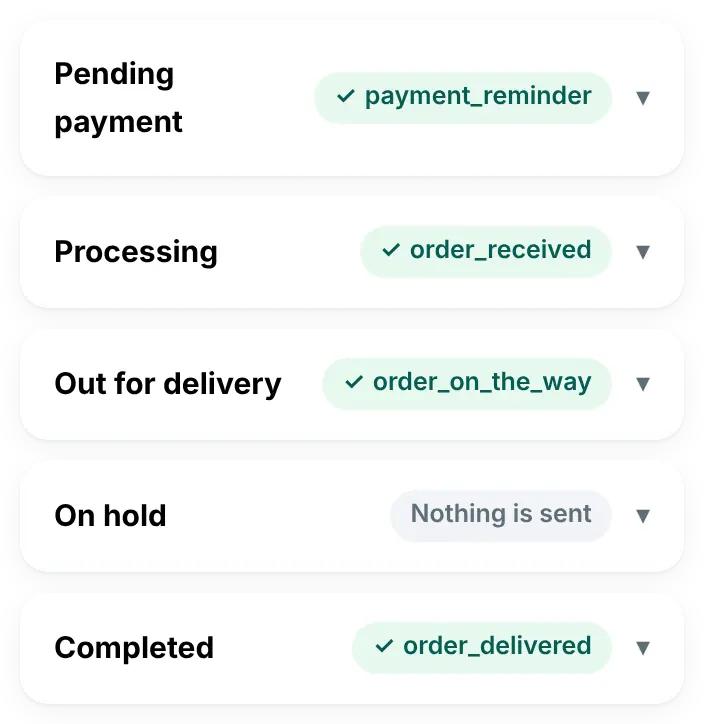
- The confirmation is Lamsa’s own template for the “Processing” status, with the service and the order number from the order
- Dana’s first message starts the Welcome menu
- She picks “Location and parking”, one of the salon’s menu choices
- “Talk to our team” hands the chat to the staff, with a notification
Lamsa Salon
Thank you, Dana! Your booking is confirmed: Hair styling session × 1. Booking number: 4410.
Dana
Hi, is there parking near you? 🚗
Lamsa Salon · button: Choose
Hello Dana 👋 Welcome! How can we help you today?
Dana
Location and parking
Lamsa Salon · button: Talk to our team
We’re on the 2nd floor of Al Noor Tower in Salmiya. Parking is behind the building. 📍
Four moments where it helps
The plan name shows the smallest plan that includes it.
A booking is paid
In every plan, from Starter upPick your own template for the status, such as “Processing” or “Completed”. It can use the customer’s first name, the items (your service), the order number, the total, the order date and a fixed text, like your address.
The same questions, answered
Pro plan and upA menu with up to 10 choices: prices, location and parking, what to bring, your cancellation rules. Customers can tap a choice or type its name or number.
Details before the visit
Pro plan and upAn “Ask a question” step saves the answer: a name, a phone number, an e-mail or any text, such as the day and time that suit them. “Notify the team” sends it to your phone, and your team confirms the time.
A customer wants a person
Pro plan and upThe “Talk to our team” button, or words like “agent” or «موظف» from any step, hand the chat to your team. Automations then pause in that chat, 12 hours by default or until you mark it done.
The features that help most
Order messages
In every plan, from Starter upA confirmation from your own template for each order status, with values from the order.
Welcome menu
Pro plan and upA ready menu for every new customer: your services, opening hours and your team.
Questions that save the answer
Pro plan and upName, phone, e-mail or any text, checked and kept for your team.
Hand-over to your team
Pro plan and upFrom any step, with a notification on your team’s phones, or an e-mail when no phone is set up.
Saved replies
Pro plan and upDirections, prices and what to bring in one tap, with the customer’s name filled in.
Done, and a rating
Pro plan and upClose the chat and ask the customer to rate it: excellent, good or bad.
What it does not do
So you know before you buy.
- No reminder the day before. The plugin has no appointment reminder, and automations only reply within 24 hours of the customer’s last message.
- No link to booking or appointment plugins. It does not read dates, times or staff from them. The messages show what is on the WooCommerce order.
- No calendar. It does not check your free times. When a customer asks for a time, your team confirms it.
What it does: a confirmation for every WooCommerce order of a service, answers to common questions, and every chat on your team’s phones.
The plan we suggest
Starter for the confirmations. Pro for the menu, the questions, the hand-over and the inbox app.
Starter
$55/year (≈ 17 KD)
For one site.
For confirmations
- Your own template for each order status
- An alert to your number for every new order
- WhatsApp login code, Connection Doctor and account health
Pro
$125/year (≈ 38 KD)
For one site.
Suggested
- Everything in Starter
- Automations: the welcome menu, questions and the hand-over to your team
- The inbox app with saved replies, done and rating
Good to know
Meta facts as of 31 October 2026.
It works when your services are WooCommerce products that customers pay for at checkout. Each order then gets your messages as its status changes.
Review usually takes minutes and can take up to 24 hours. Use one specific Utility template per status, such as “Your booking is confirmed”. Meta may move a general template to another category.
Meta bills your own WhatsApp Business account for each delivered message, at its rate for your customer’s country. Since 1 October 2026 that includes your replies and the menu’s answers inside the 24-hour customer service window: the first 1,000 each month on each WhatsApp number cost nothing, then Meta charges its service rate. Utility templates sent inside the window are charged at the utility rate. When a customer writes from your click-to-WhatsApp ad and you answer within 24 hours, Meta charges nothing in that chat for up to 7 days. We add nothing on top. See Meta’s pricing page.
Questions from salons, trainers and consultants
Can it remind customers the day before?
No. The current version (2.10.0) has no appointment reminder. Automations answer customers who wrote in the last 24 hours, and the order messages follow the order status.
Does it work with my booking plugin?
It does not read booking dates or times. If your bookings are paid through WooCommerce checkout, each order still gets your order messages, without the date and time filled in.
Can customers choose a time in the chat?
An “Ask a question” step can ask for the day and time that suit them and save the answer. The plugin does not check your free times, so your team replies to confirm.
Can my staff answer from their own phones?
Yes, with Pro. The inbox app works on every phone where someone logs in with a WordPress administrator account, and each phone with notifications on gets them.
Is Starter enough?
Starter sends a confirmation for each order status. The menu, the questions, the hand-over and the inbox app start with Pro.
Give your front desk a break
Pick a plan today, or ask us anything first.