A WhatsApp message to your customer
at every step of their order
In every plan, from Starter up
When you change an order’s status in WooCommerce, your customer gets your WhatsApp message for that status by itself, with the tracking number filled in. You get a WhatsApp alert for every new order.
- You set it up once; after that there is nothing to press
- Your own words for each status, in Arabic or English
- Each status is sent once per order, never twice
- An alert to your own WhatsApp for every new order
What your customer gets on WhatsApp

What you set once in WordPress
How it works
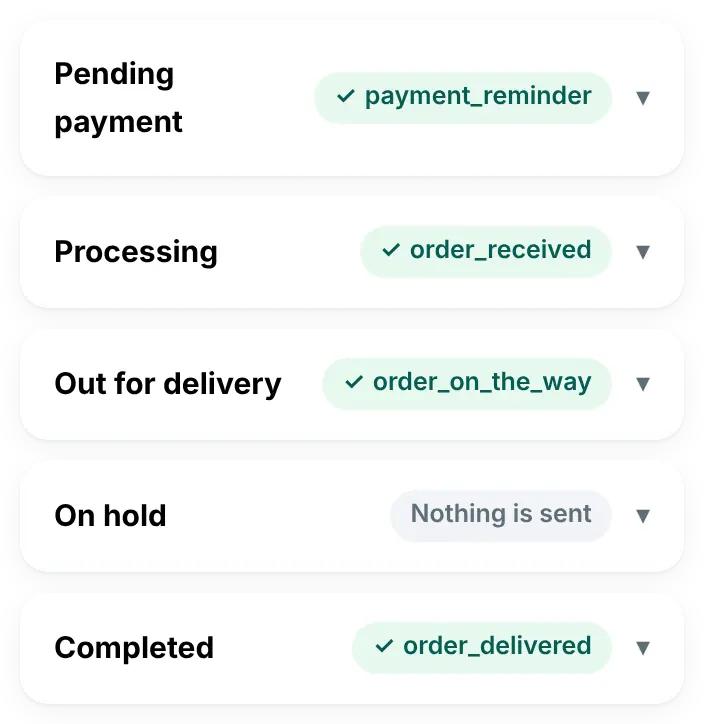
Once, in WordPress, you choose a message for each order status (step by step below). After that, every order goes like this, without you:
A customer orders, and you get an alert
A WhatsApp message to your own number with the order number, the customer’s name, the total and the payment method.
You change the order’s status
In WooCommerce, as you do today. Statuses you added yourself work too, and the plugin can add “Out for delivery” and “Delivered” for you.
Your customer gets your message
Once per status, with the values from their order. A status with no message of its own here uses the one “status changed” message in Settings → WooCommerce, if you turned it on there; otherwise nothing is sent.
Once, in WordPress: a message for each status
Open WAPI Connect → Order messages and turn on “Send order updates on WhatsApp”.
Open a status, such as “Out for delivery”, and choose its template: the message Meta has approved that this status sends.
Fill the blanks. A blank is a place in your message that is filled from each order, such as the customer’s name. On the screen the blanks are called variables and shown as {{1}}, {{2}} and so on. For each one, choose a value from the order:
- the customer’s first name
- the order number, total or products
- the delivery area, tracking number or tracking link
- a fixed text of your own (and more values in the list)
Add an “If empty, use…” text for anything an order may not have. “Preview” fills the message in with your latest order, and “Send test” sends it to your own WhatsApp.
What you set for each status
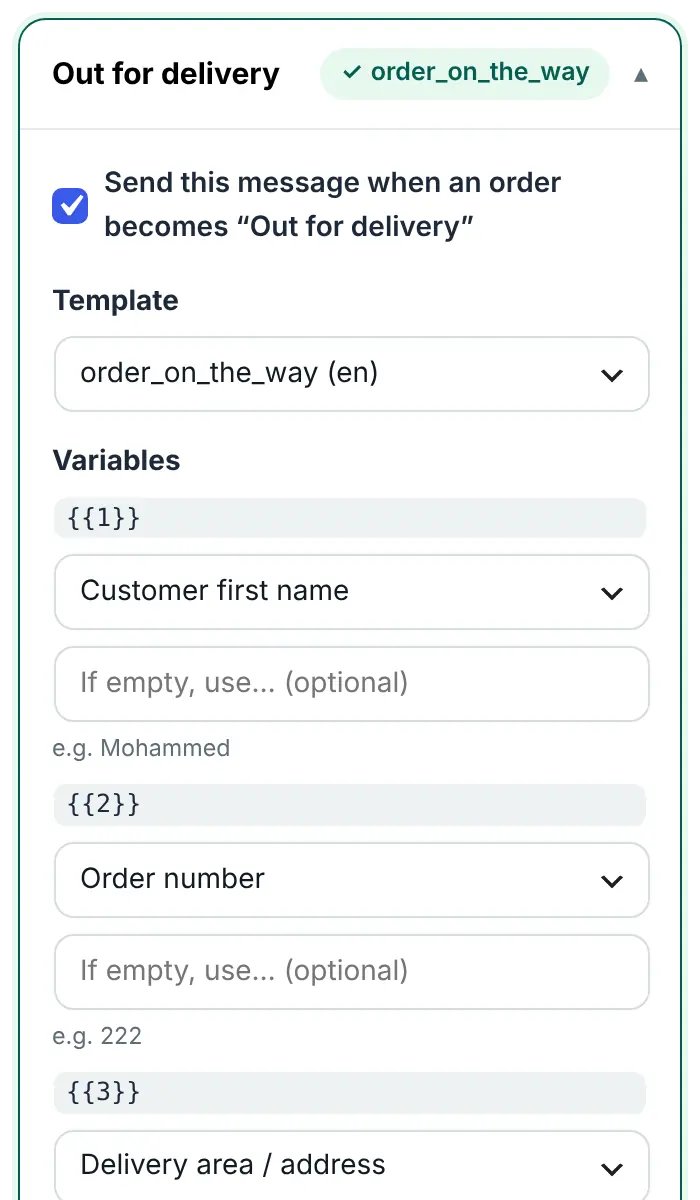
Each status needs an approved Utility template. Start from the ready order updates pack in WAPI Connect → Templates: “Use for” puts a template straight into a status. You can also create templates in Meta’s WhatsApp Manager. Meta reviews each template, usually in a few minutes and at most within 24 hours. Keep offers and discounts out of these templates, or Meta can move them to the marketing category. See message templates.
One order, message by message
Mohammed’s order #222, from the moment he orders until it arrives: who gets which message, and when. The words are an example: you write your own in your templates.
1. Mohammed orders
To you, on your own WhatsApp
New order #222 from Mohammed. Total: 42.000 KD. Payment: cash on delivery.
2. You set the order to “Processing”
To Mohammed, on WhatsApp
Hi Mohammed 🌷 We received your order #222 (42.000 KD). We will let you know as soon as it is on its way.
3. You set it to “Out for delivery”
To Mohammed, on WhatsApp
Good news, Mohammed! 🚚 Your order #222 is out for delivery to Mishref, Block 5, Street 14 today. Tracking number: NKH‑48213‑KW. Thank you for shopping with us.
Track delivery
4. You set it to “Completed”
To Mohammed, on WhatsApp
Your order #222 has been delivered ✅ Enjoy, Mohammed! Any feedback? Just reply to this message.
- In WAPI Connect → Order messages, each status shows the template it sends
- With the inbox app (Pro plan and up: your store’s WhatsApp chats on your phone), every order message and the customer’s reply show in their chat
Tracking numbers, filled in for you
Choose “Tracking number” or “Tracking link” for a variable, and the plugin reads them from the order:
- WooCommerce Shipment Tracking and Advanced Shipment Tracking: the latest tracking number, and its link when one is saved with it
- The tracking-number field AfterShip saves on the order (
_aftership_tracking_number) - Simple order fields such as
tracking_numberandtracking_linkortracking_url, which a courier plugin or your developer can fill
WhatsApp does not accept an empty value. If an order has no tracking number yet, your “If empty, use…” text is sent instead, or a dash.
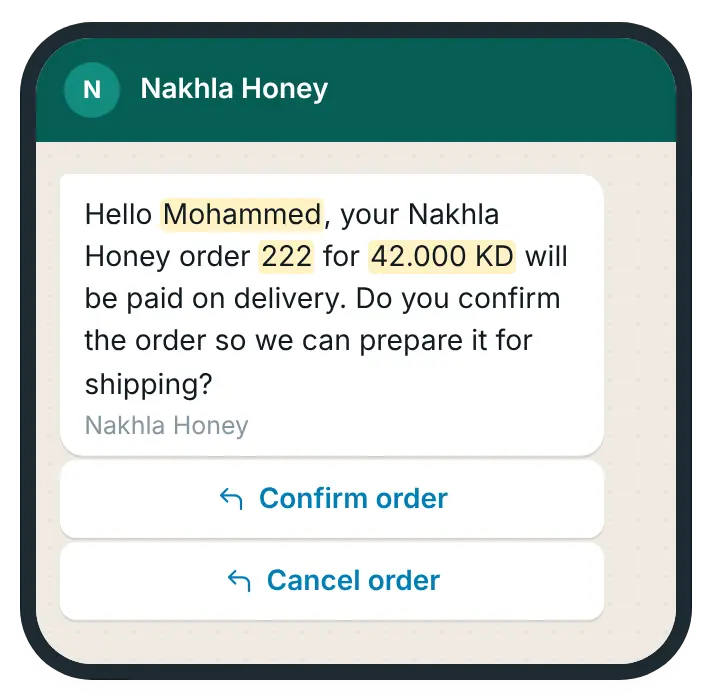
Cash on delivery: the customer confirms with one tap
In every plan, from Starter up
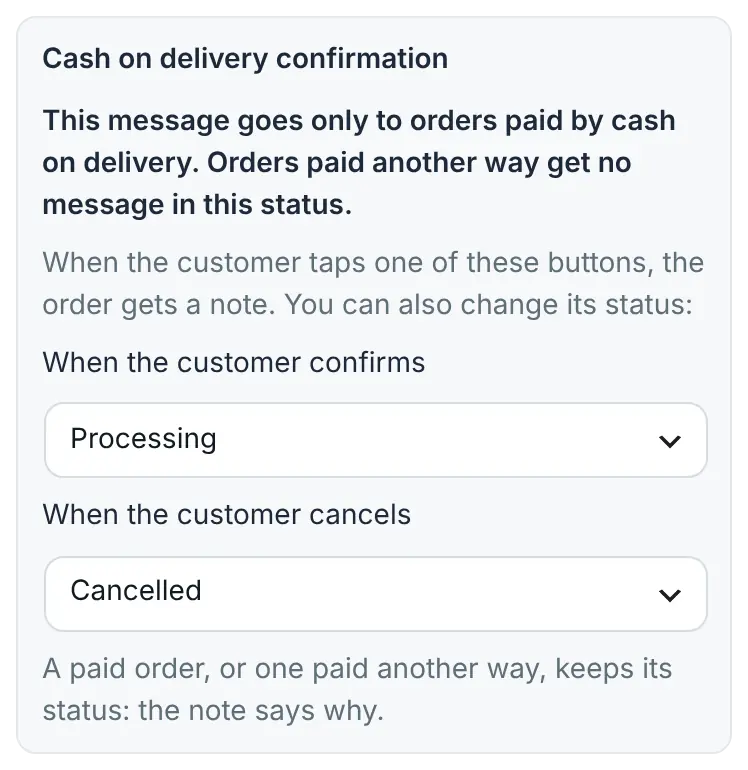
- Send a template with Confirm and Cancel reply buttons. Each tap adds a note to the order, and can change its status: you choose the status for each button
- You choose it inside one status, like any order message: Pending payment, On hold or Processing. It goes only to unpaid cash-on-delivery orders in that status. Orders paid another way get the general “status changed” message from Settings → WooCommerce if you turned it on, and otherwise nothing
- The plugin knows each button by its place in the template, so an edit that moves or rewords them is refused, and a template changed in WhatsApp Manager must be chosen again
For a tap to change the order’s status by itself, add your Meta app’s secret key once, in Settings → WhatsApp API (Meta calls it the App Secret). Without it, the tap only reaches you as a note on the order, and the status stays as it is.
What your customer gets on WhatsApp
What you choose in WordPress
Know about every new order the moment it arrives
In every plan, from Starter up
- A WhatsApp message to your own number for every new order, with the order number, customer name, phone, total and payment method
- Works with WooCommerce’s block checkout, and with orders created in other ways, such as payment pages that create the order themselves
- Optional: a message to you every time an order changes status
- Connection Doctor shows when the last alert went out, or why it failed
Turn it on in Settings → WooCommerce (“Admin New Order Notification”) and write your number in Settings → General (“Admin WhatsApp Number”). The alert uses a template too, so it needs one approved in Meta.
What you turn on in WordPress

What Meta decides about order messages
As of 17 October 2026. Order messages go out as Utility templates in Meta’s WhatsApp Cloud API.
- Meta reviews each template, usually in a few minutes and at most within 24 hours
- Keep offers and discounts out of these templates, or Meta can move them to the marketing category
- Each delivered order message is a utility message, billed by Meta at its rate for the customer’s country
- Meta’s policy asks you to have the customer’s permission before messaging them on WhatsApp: privacy and consent
Also in order messages
Order confirmation
Send a confirmation when the order moves to Processing (recommended, so unpaid orders get none), when the payment completes, or when the order is created. If Processing also has its own message, keep only one of the two.
“Out for delivery” and “Delivered”
The plugin can add these two statuses to WooCommerce, so customers hear when the order leaves and when it arrives.
A discount after delivery or cancellation
Send a discount code when an order moves to “Delivered” or is cancelled, only to customers who agreed to marketing messages.
A place in a template
A template with a location header sends the place you enter for that status, such as your branch.
Only templates it can send
The template list in Order messages leaves out what it cannot send: carousels, limited-time offers and login codes.
In the customer’s chat
Pro plan and upWith the inbox app, every order message shows in the customer’s chat with the text they received.
What you need
- An approved Utility template for each status you want to message. Create it in WAPI Connect → Templates; our template guide shows what to write.
- The customer’s phone number on the order (the WooCommerce billing phone)
- Your number connected to Meta’s WhatsApp Cloud API; Connection Doctor checks it
- For cash-on-delivery taps to change the order status: the App Secret saved in Settings → WhatsApp API
- Any plan, from Starter up
What it costs
To us
Included in every plan, from $55/year (≈ 17 KD).
To Meta
Each delivered order message is a utility message. Meta bills your own WhatsApp account at its rate for the customer’s country (as of 17 October 2026).
Your alert
The new-order alert to you is a template message too, billed by Meta in the same way.
Meta’s rates are on its pricing page.
Questions about order messages
Can I use my own order statuses?
Yes. The screen lists every status your WooCommerce has, including statuses added by other plugins. The plugin can also add “Out for delivery” and “Delivered” for you (Settings → WooCommerce → Custom order statuses).
Will a customer ever get the same update twice?
No. Each status is sent once per order, even if the order moves back and forth between statuses.
Can I send Arabic to some customers and English to others?
Each status uses one template in one language. Pick the language most of your customers read.
Which shipping plugins fill in the tracking number?
WooCommerce Shipment Tracking and Advanced Shipment Tracking (the number, and the link when one is saved), AfterShip’s tracking-number field, and simple order fields named tracking_number, tracking_link or tracking_url. If your courier saves tracking somewhere else, a developer can copy it into one of these fields.
What happens to statuses I do not set up?
They keep the plugin’s general settings: one “status changed” template for the statuses you tick in Settings → WooCommerce. If those are off, nothing is sent. Your older settings keep working after an update.
Can customers confirm or cancel cash-on-delivery orders on WhatsApp?
Yes. Send a template with Confirm and Cancel reply buttons, and choose the status each tap gives the order. It goes only to unpaid cash-on-delivery orders that are pending payment, on hold or processing, and a tap changes the status only when the App Secret is saved in Settings → WhatsApp API. Without it, the tap adds a note marked “not verified”.
Do customers have to agree first?
Meta’s WhatsApp Business Messaging Policy asks businesses to have a customer’s permission before messaging them on WhatsApp, so tell customers at checkout that order updates come on WhatsApp. The plugin adds a WhatsApp consent checkbox to WooCommerce’s classic checkout page. More in privacy and consent.
What does each message cost?
Nothing from us. Meta charges each delivered order message at its utility rate for the customer’s country and bills your own WhatsApp account. See Meta’s pricing page.
Send your first order update this week
Order messages and the new-order alert are in every plan, from Starter up.