Know your WhatsApp account is healthy, before it costs you sales
In every plan, from Starter up
If your WhatsApp messages stop, you find out why and what to fix. Connection Doctor checks every link between your store and WhatsApp. Account health shows what Meta knows about your number, and alerts you when Meta reports bad news.
Find them in WAPI Connect → Health & tools. On Account health, “Refresh” reads Meta again.
- Every link between your store and WhatsApp, checked
- Your Meta limit, quality and costs, read from your own account
- Bad news from Meta reaches you by e-mail and on your plugin screens, and, Pro plan and up, on your phone
- These checks send no messages, so Meta does not bill them
When something is wrong

What Meta knows about your number
How it works
Nothing to set up for the checks: they read your WhatsApp connection details. For the alerts, switch on the account webhook fields in your Meta app (the screen lists them).
Connection Doctor checks every link
Between your site and WhatsApp. It shows what is wrong in plain words, and fixes common problems in one click.
Account health shows what Meta knows
How many customers you may message a day, your quality rating and what WhatsApp cost you.
Bad news reaches you
When Meta reports a problem: an e-mail and a banner on the plugin screens, and, Pro plan and up, a notification on your phone.
“Why did my messages stop?” Connection Doctor answers
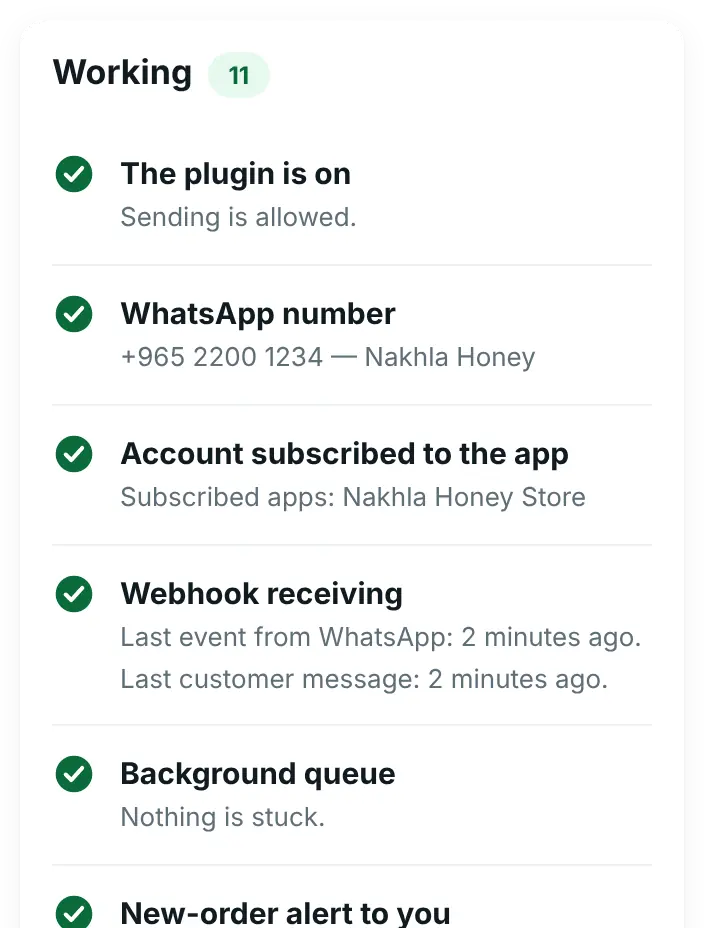
It checks each link between your site and WhatsApp. Problems come first, each with what to do. What works is folded into one “Working” card.
- Is your number connected? Your connection details, the number, and whether it is on the Cloud API.
- Do customer messages reach your site? It shows when the last message from WhatsApp arrived. If they stop arriving, one button fixes it.
- Are your messages going out? Messages stuck in the background queue, with “Run them now”, and failed messages of the last 24 hours grouped by reason, with “Fix in Meta”.
- Your own alerts The new-order alert to you, HTTPS, permalinks and phone notifications.
For your developer: the same card shows the webhook details (Callback URL and verify token) ready to copy, and the buttons “Subscribe now” and “Send them to this store”.
Find it in WAPI Connect → Health & tools → Connection Doctor.
What you see in WordPress
Your Meta limit, quality and costs, read from your own account
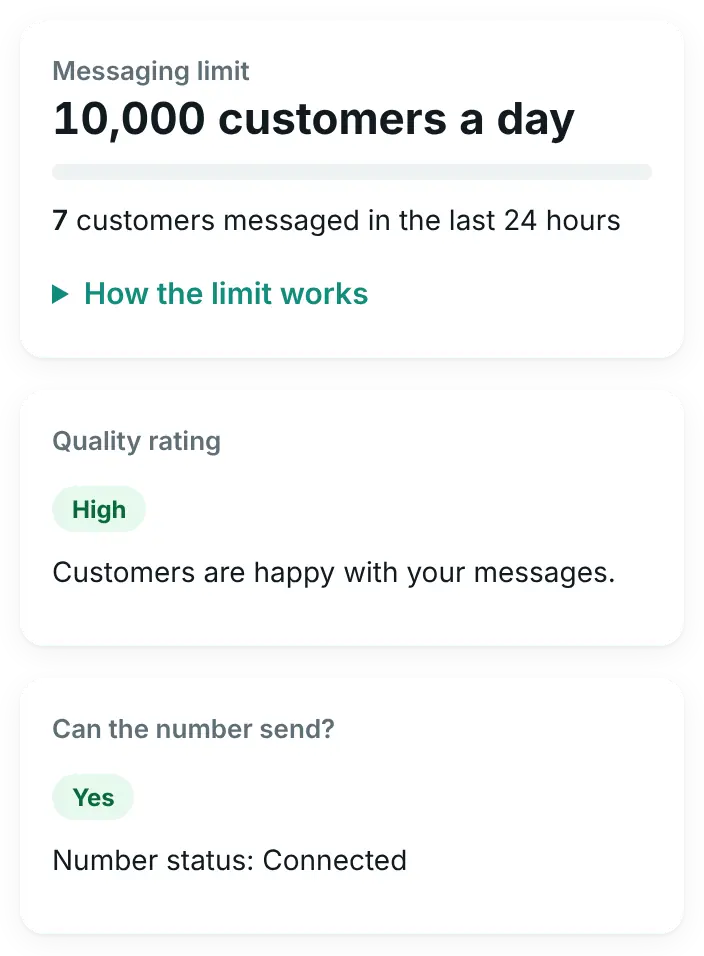
Account health answers these questions:
- How many customers may I message today? The messaging limit, and how many this store messaged in the last 24 hours.
- Is WhatsApp happy with my messages? The quality rating, with advice.
- Can my number send? Yes, limited or blocked, with Meta’s reason.
- What did WhatsApp cost me? The last 30 days, by type of message.
- Which templates have a problem? Paused, rejected or rated low.
What you see in WordPress

When Meta reports bad news, you hear about it
Meta sends account events to your store. The plugin explains each one in plain words and lists it under “Alerts from Meta”. When it is bad news, it also tells you in three ways, shown below.
What counts as bad news
- Your messaging limit went down, or your number was flagged for low quality
- Meta restricted or disabled your WhatsApp account, or reported a policy violation
- A template was paused, rejected, rated low or moved to another category
- Meta rejected your account review or your display name
Alerts need the account webhook fields switched on in your Meta app. The Account health screen lists them, and the webhook guide walks you through it.
What you see in WordPress

By e-mail
To your site’s admin e-mail address, with what happened in plain words.
On your phone
Pro plan and upAs a notification from the inbox app, on the phones where you turned notifications on.
On your plugin screens
A banner with the most important problem and a link to the details.
A warning before you go over today’s limit
Business plan and up
On the Business plan, the campaign wizard uses your messaging limit: it warns you when you choose more customers than WhatsApp allows today, and can cut the campaign to the allowed number in one click.
What you need
- Your WhatsApp connection details in the plugin, with a permanent access token
- The account webhook fields switched on in your Meta app, for the alerts
- The inbox app (Pro plan and up), only for alerts on your phone
- Any plan, from Starter up
These checks send no messages, so Meta does not bill them.
Does it fix problems in Meta for me?
It fixes what it can safely do from your store: it subscribes your WhatsApp Business Account to your app, sends customer messages to this store and runs tasks that got stuck. For everything else it explains the problem in plain words and links to the right place in Meta.
How exact are the numbers?
The limit, quality and costs come from Meta and are kept for 10 minutes; “Refresh” reads them again. Costs are Meta’s approximate figures and can be a few hours late. The number of customers messaged in the last 24 hours is counted from this plugin’s own log, so messages sent from other tools are not included.
Can it raise my messaging limit?
No, only Meta can. New accounts start with a low daily limit (250 customers a day at the time of writing, 17 October 2026) that grows with business verification and good quality. The screen shows where you stand.
Do I get alerts on the Starter plan?
Yes: by e-mail and as a banner on the plugin screens. Notifications on your phone come through the inbox app, which is part of the Pro plan.
Is it useful when I set up stores for clients?
Yes. Connection Doctor names the exact setting to fix on each site, from the Callback URL to the App Secret, so you do not have to guess.
See your WhatsApp account clearly
Connection Doctor and account health are in every plan, starting with Starter.
For companies and organisations, or any question: our management line
+965 6993 7627