From a WhatsApp chat button to messages that answer and sell for you
Suggested plan: Starter to Pro
A chat button opens WhatsApp, and from there everything is up to you. WAPI Connect Pro uses Meta’s official WhatsApp Cloud API, so your store sends order updates by itself, every chat reaches an inbox app on your phone, and a menu answers common questions day and night.
- Order updates for every status, sent by itself
- An alert to you for every new order
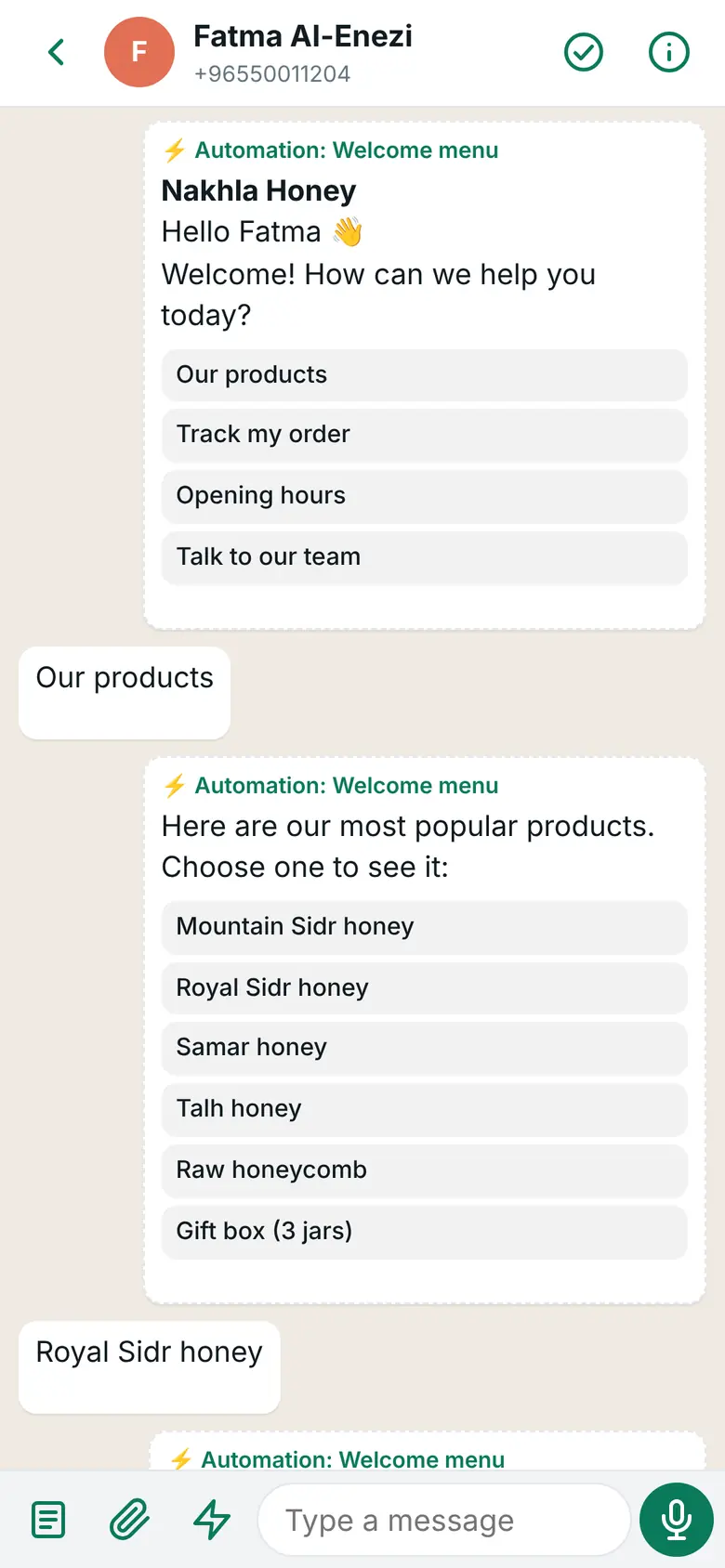
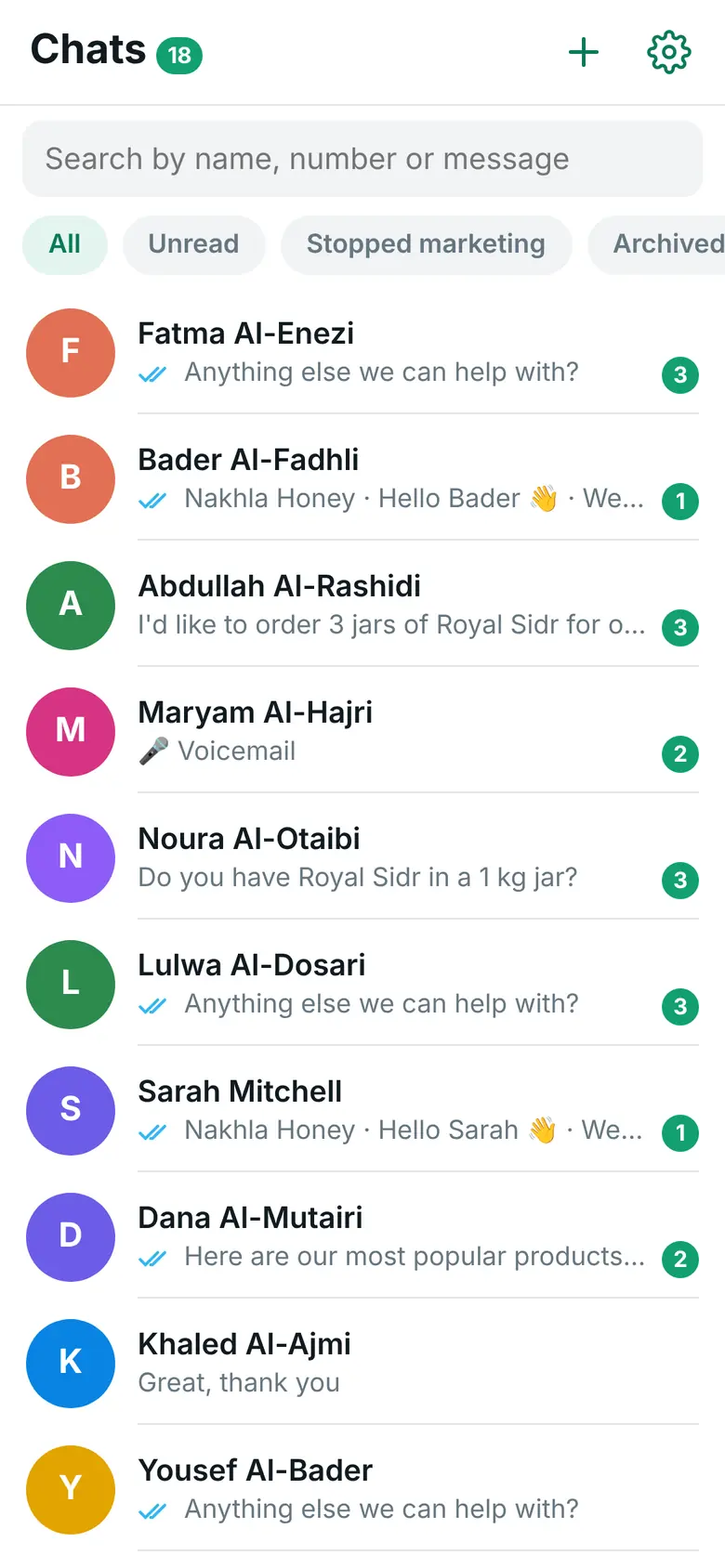
- Every chat in the inbox app on your phone, with a notification (Pro)
- A menu that answers common questions day and night (Pro)
What your customer gets on WhatsApp

What you see on your phone
Sound familiar?
What store owners with a chat button tell us.
“The button works. Then I type everything.”
Every price, every stock question and every “thank you” is typed by hand, one chat at a time.
“I send order updates when I remember.”
Customers ask where their order is, because nobody told them it left.
“Night chats wait until morning.”
The button keeps working after you close. The answers do not.
A question late at night, answered from WooCommerce
Ahmad taps the chat button on Zawiya Gadgets’ store after the shop has closed. Every answer here comes from the ready Welcome menu automation.
- The chat button opens WhatsApp to the store’s number, as before
- His first message starts the Welcome menu
- “Track my order” sends the status of his latest orders, straight from WooCommerce
- Two buttons: back to the menu, or a person from the team
Ahmad
Hi 👋
Zawiya Gadgets · button: Choose
Hello Ahmad 👋 Welcome! How can we help you today?
Ahmad
Track my order
Zawiya Gadgets
Your latest orders:🧾 #5120 · Out for delivery
14.750 KD · 16 October 2026Zawiya Gadgets · button: Main menu, Talk to our team
Anything else we can help with?
What changes when you add WAPI Connect Pro
Your button keeps doing its job. The plan name shows the smallest plan that adds each part.
| What happens | Chat button only | With WAPI Connect Pro |
|---|---|---|
| A customer starts a chat from your store | Yes | Yes Keep your button |
| An update for every order status, sent by itself | –No | Yes Starter |
| An alert to you for every new order | –No | Yes Starter |
| A reminder with a link back to a cart left behind | –No | Yes Starter |
| The customer’s WooCommerce orders next to the chat | –No | Yes Pro |
| A menu that answers by itself, with your products and Buy now | –No | Yes Pro |
| “Where is my order?” answered from WooCommerce | –No | Yes Pro |
| A charge from Meta for each message | None in the WhatsApp Business app | Yes, at Meta’s rate, billed to you by Meta |
Your button stays. What happens after the click changes.
- WAPI Connect Pro does not add a chat button of its own, so keep the one you have
- Point it at the number you connect to the Cloud API
- If your button lets you set the first message, add an automation’s link code to it, and a click starts that automation with its own welcome
- Every chat from the button lands in the inbox app, with a notification (Pro)
What you see on your phone
The features that help most
Order messages
In every plan, from Starter upYour own template for each order status, custom statuses too, with tracking values filled in.
New-order alert
In every plan, from Starter upA WhatsApp message to your own number for every new order.
Cart reminders
In every plan, from Starter upUp to three reminders with a link back to the cart, and the sales they brought back.
Inbox app
Pro plan and upEvery chat on your phone, with saved replies, the customer’s orders and a rating when you are done.
Menus with Buy now
Pro plan and upA welcome menu, products inside the chat and a way to a person from any step.
Answers after closing time
Pro plan and upThe ready “Outside working hours” automation tells customers when you are back.
The plan we suggest
Starter adds the messages your button cannot send. Pro adds the inbox app and the automations.
Starter
$55/year (≈ 17 KD)
for one store.
First step
- Order messages for every status
- The new-order alert and cart reminders
- WhatsApp login code, Connection Doctor and account health
Pro
$125/year (≈ 38 KD)
for one store.
Suggested
- Everything in Starter
- The inbox app on iPhone and Android, with saved replies
- Automations: menus, products with Buy now, order tracking and a hand-over to your team
Good to know
Meta facts as of 31 October 2026.
If your button points at a number in the WhatsApp Business app and you connect that number, it leaves the app. Keeping it in the app at the same time is not offered. You can also connect a new number and point the button at it. Either way, with Pro your chats then live in the inbox app on your phone; Starter sends messages but has no inbox for replies.
Chatting in the WhatsApp Business app has no per-message charge. On the Cloud API, Meta bills your own WhatsApp Business account for each delivered message, at its rate for your customer’s country: order updates, reminders, and since 1 October 2026 your replies inside the 24-hour customer service window too, after the first 1,000 each month on each WhatsApp number, at its service rate. When a customer writes from your click-to-WhatsApp ad and you answer within 24 hours, Meta charges nothing in that chat for up to 7 days. We add nothing on top (as of 31 October 2026). See Meta’s pricing page.
Order updates and cart reminders use templates you create in WAPI Connect → Templates (or in Meta’s WhatsApp Manager). Meta reviews each one; it usually takes a few minutes and can take up to 24 hours. Cart reminders are marketing messages: send them only to customers who agreed.
Questions from stores with a chat button
Do I have to remove my chat button plugin?
No. WAPI Connect Pro has no floating chat button of its own. Keep yours and point it at the number you connect.
Will my customers see a different number?
Only if you connect a new number; then update your button and your links. If you connect your current number, it stays the same but leaves the WhatsApp Business app.
Does it answer customers at night?
Yes, with automations in Pro: menus, products and order tracking reply to customers who wrote in the last 24 hours. Words like “agent” reach a person from any step, and your team gets a notification.
Can my team and I both answer?
Yes. The inbox app works on every phone where someone logs in with a WordPress administrator account, and each phone with notifications on gets them.
Which plan should I start with?
Starter if you want order updates, the new-order alert and cart reminders. Pro if you also want to answer from the inbox app and let a menu handle common questions.
Make your chat button work harder
Pick a plan today, or ask us anything first.