Move from messy DMs to a real store,
and keep chatting with customers on WhatsApp
Suggested plan: Pro, plus the setup service
You built your business one Instagram and Snapchat message at a time. With your own WooCommerce store and WAPI Connect Pro, orders go through a real checkout, customers get their updates on WhatsApp, and you still chat with them from your phone.
- Each place you post starts its own automation (Pro)
- Buy now opens checkout with the product in the cart (Pro)
- Order messages tell the customer each step
- Every reply reaches the inbox app on your phone (Pro)
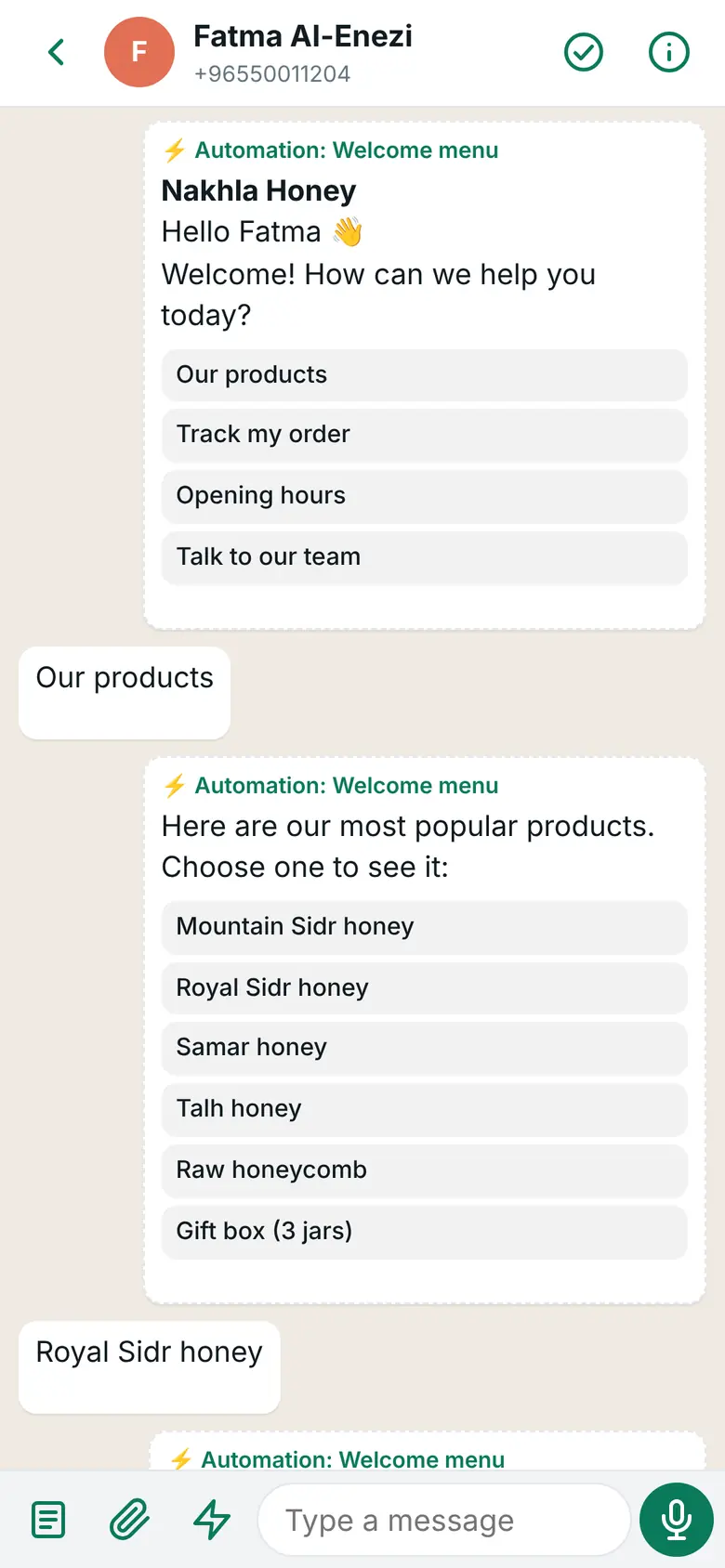
What you see in the inbox app on your phone
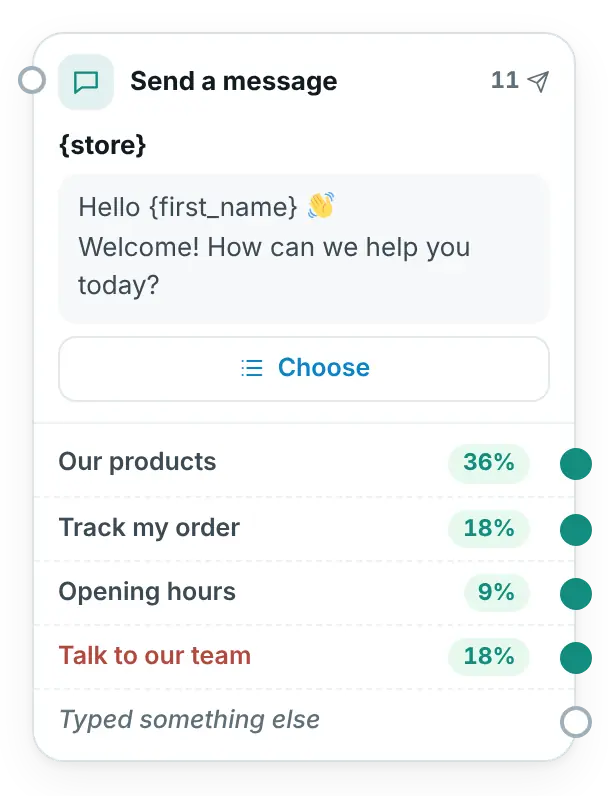
What you build once in WordPress
Sound familiar?
What sellers who started on social media tell us.
“My orders live in screenshots and notes.”
The address in one chat, the colour in another, the payment somewhere else. One mix-up and an order goes wrong.
“Everyone asks the same three questions.”
How much, how long for delivery, how do I pay. You type the same answers all day.
“If I stop answering, sales stop.”
Every sale needs you in the chat, so a day off or a busy evening costs you orders.
From a Snapchat profile to a paid order
Hessa taps the WhatsApp link in Shamaa Candles’ Snapchat profile. The store’s messages here come from an automation and, after she pays, from the order messages.
- The link carries the code SNAP, which starts the right automation
- A “Show products” step lists the newest candles, and she taps one
- Buy now opens checkout with the candle set already in the cart
- After she pays, the order message confirms it by itself
Hessa
Hello! I want to order SNAP
Shamaa Candles · button: View products
Welcome, Hessa! 🕯️ Here are our newest candles. Choose one to see it:
Hessa
Oud candle set
Shamaa Candles · button: Buy now
Oud candle set · 9.500 KD: Three hand-poured candles in a gift box.
Shamaa Candles · order message
Order #318 is confirmed. Thank you, Hessa! We’ll message you when it is on its way.
Four moments where it helps
The plan name shows the smallest plan that includes it.
One link for each place you post
Pro plan and upA wa.me link or QR code with its own code starts its own automation: one for your Instagram bio, one for your Snapchat profile, one for the card in every bag. The QR code is made in your browser, with “Download the picture”.
The click from your ad
Pro plan and upThe ready “Customers from ads” automation greets people who come from your click-to-WhatsApp ad on Instagram or Facebook, asks their name and what they are looking for, and alerts your team. Meta charges nothing for your messages in these chats for up to 7 days after your first answer (as of 31 October 2026).
A checkout instead of “send me your address”
In every plan, from Starter upThe order goes through your WooCommerce checkout, with the address and payment in one place. Order messages tell the customer each step, and the WhatsApp login code lets her sign in with no password.
You still sell by chat
Pro plan and upEvery reply reaches the inbox app on your phone, with the customer’s orders next to the chat and saved replies for prices, delivery and payment.
The features that help most
Links, QR codes and ads
Pro plan and upEach place you post can start its own automation, with its own welcome.
Products with Buy now
Pro plan and upYour newest pieces, a category or products on sale, inside the chat, with a button to checkout.
Inbox app
Pro plan and upEvery chat on your phone with a notification, saved replies and the customer’s orders.
Order messages
In every plan, from Starter upConfirmed, out for delivery, delivered: your own message for each order status.
WhatsApp login code
In every plan, from Starter upCustomers sign in and check out with a code sent to their WhatsApp.
Know what WhatsApp sold
Pro plan and upBuy now links carry utm_source=whatsapp, so WooCommerce’s order attribution shows the order came from WhatsApp.
Moving to your own store, step by step
You keep your followers. You give them a better place to order.
Your WooCommerce store
Build it yourself or with a developer. WAPI Connect Pro does not build the store; it works inside it.
A number for the store
The number you connect leaves the WhatsApp Business app. Many sellers pick a new number for the store.
Connect it with Meta
Follow the install guide, or let us do it with you through the setup service.
Share your new links
Put an automation’s link in your Instagram bio and Snapchat profile, and its QR code on your cards.
Online selling in Kuwait has its own rules. Check with the Ministry of Commerce and Industry what applies to your business. This page is not legal advice.
The plan we suggest
Pro if you sell by chat. Add the setup service if you would rather not do the Meta part yourself.
Starter
$55/year (≈ 17 KD)
For one store.
To start
- Order messages for every status
- The new-order alert to your number
- WhatsApp login code and cart reminders
Pro
$125/year (≈ 38 KD)
For one store.
Suggested
- Everything in Starter
- Automations from links, QR codes and ads, with Buy now
- The inbox app with saved replies
Setup service
$99 (≈ 30 KD)
Once, with any plan.
Done with you
- Your Meta app and WhatsApp account, in your own Meta business portfolio
- Your number registered, a permanent token and the webhook
- Your first order-message templates sent to Meta for review
Good to know
Meta facts as of 31 October 2026.
The number you connect works through Meta’s WhatsApp Cloud API and leaves the WhatsApp Business app on your phone. Keeping it in the app at the same time is not offered. With Pro, your chats then move to the inbox app, so you still answer from your phone. Starter sends messages but has no inbox for replies.
WAPI Connect Pro does not answer Instagram or Snapchat messages. Your profiles and ads send people to WhatsApp with a link or a click-to-WhatsApp ad, and the chat goes on there.
Meta bills your own WhatsApp Business account for each delivered message, at its rate for your customer’s country. Since 1 October 2026 that includes messages inside the 24-hour customer service window: Meta charges nothing for the first 1,000 replies each month on each WhatsApp number, then charges its service rate. Utility templates sent inside the window are charged at the utility rate. When a customer writes from your click-to-WhatsApp ad and you answer within 24 hours, Meta charges nothing in that chat for up to 7 days. We add nothing on top. See Meta’s pricing page.
Questions from social sellers
Do I need a website first?
Yes. WAPI Connect Pro is a plugin for a WooCommerce store on WordPress. It adds WhatsApp to the store you have; it does not create one.
Can you set it up for me?
The setup service does the Meta part with you, on your own Meta account: the app, the WhatsApp account, your number, a permanent token, the webhook and your first order-message templates. Meta’s reviews still take their time: a template usually minutes and up to 24 hours, business verification can take days.
Can I send offers to my Instagram followers?
No. Followers are not contacts. Campaigns, in the Business plan, go only to customers who agreed to receive WhatsApp messages from your store.
Can customers still order by chat, without the website?
They can chat with you as before, and you answer from the inbox app. The order itself is placed through your store’s checkout, which a Buy now button opens with the product in the cart. A product with options, such as a size, opens its page so the customer can choose.
Does it work with Snapchat ads?
Click-to-WhatsApp ads are Meta’s ads on Facebook and Instagram. From Snapchat, use a wa.me link with its own code in your profile; it starts your automation the same way.
Give your followers a real store to order from
Pick a plan today, or ask us anything first.