Bring honey, dates and coffee buyers back every season,
with offers they agreed to receive
Suggested plan: Business
Ramadan, Eid, a new harvest: your customers buy again when the season comes. WAPI Connect Pro finds them in your store’s orders, sends the offer on WhatsApp to the ones who said yes, and answers the questions that follow.
What your customer gets on WhatsApp

What you see after sending

Sound familiar?
Moments that come up again and again for honey, dates and coffee sellers.
“Every Ramadan I message old customers one by one.”
It takes days from your own phone, and you never know who read it.
“I don’t know who stopped buying.”
The orders are in WooCommerce, but nothing tells you who bought last season and not this one.
“People ask which one to choose, every day.”
Sidr or Samar, Khalas or Sukkari, which box makes a good gift: the same questions, many times a day.
A seasonal offer, a question, and a person when needed
Hessa bought from Waha Dates last year and agreed to receive offers. This is what she sees when the new season starts.
- A campaign to customers who stopped buying, with a Copy code button for the coupon and a link button
- Her question goes to an AI reply step, which says it is automatic and answers from your store information
- She writes “agent”, and the chat moves to your team with a notification on your phone
- Her reply counts as replied in the campaign report
Waha Dates · buttons: Copy code, Shop the season
Hello Hessa 🌴 The new Khalas season is here. As one of our customers, you get 10% off this week.
Hessa
Which is softer, Khalas or Sukkari?
Waha Dates · automatic AI reply
🤖 I am the automatic AI assistant of Waha Dates. Write “agent” anytime to talk to our team.
Sukkari is the softer one, with a light sweet taste. Khalas is firmer, with a caramel taste. Sukkari 1 kg box: 7.500 KD.
Hessa
Agent please, I need gift boxes for Eid
Waha Dates
Sure! One of our team will answer you here shortly. 🙏
Four moments where it helps
The plan name shows the smallest plan that includes it.
The season opens
Business plan and upChoose who gets the offer: recent buyers, customers who stopped buying, best customers or a tag. Add a photo, a Copy code button and a link button, and schedule it for the first day of the season.
Your customer list in one place
Business plan and up“Sync from store” brings every customer with their orders and what they spent. Import the list you keep in Excel or CSV, and say who agreed. Only contacts who agreed get campaigns, and “stop” or «إيقاف» stops them.
“Which one should I choose?”
Pro plan and upSaved replies made from your products and prices answer it in one tap, and an automation can list your gift boxes with a Buy now button. With AI replies (Business), the answer also comes at night, from the store information you write.
After the box arrives
In every plan, from Starter up“Discount after delivery” sends a code for the next order when you mark the order “Order delivered”, only to customers who agreed to marketing messages.
The features that help most
Campaigns
Business plan and upSeasonal offers to customers who said yes, with a photo, a coupon button and a clear report.
Contacts
Business plan and upSync from your store, import Excel or CSV, tags and a consent log.
AI replies
Business plan and upAnswers about your products, delivery and payment, with your own key, handing over to a person when needed.
Products with Buy now
Pro plan and upBest sellers or a category such as gift boxes, inside the chat, with a button to checkout.
Saved replies
Pro plan and upPrices, delivery and how to order, ready in one tap, with suggestions made from your store.
Order messages
In every plan, from Starter upConfirmed, out for delivery, delivered: your own message for each order status.
A seasonal campaign in four steps
Business plan and up
- Message: pick your approved template and see a live WhatsApp preview
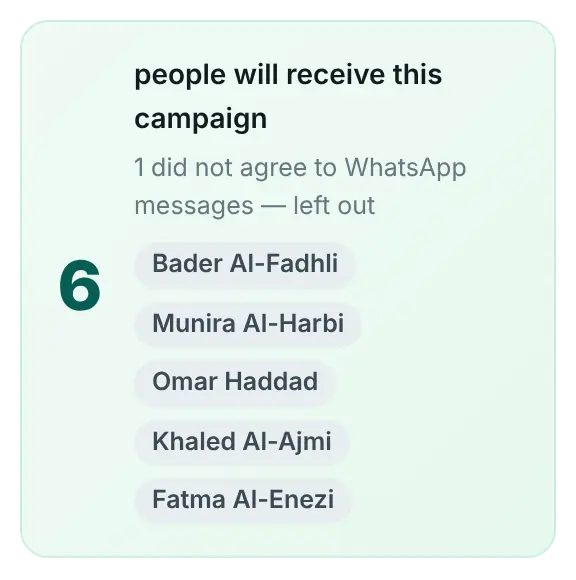
- Audience: recent buyers, customers who stopped buying, best customers, a tag, or everyone who can receive campaigns
- Send: now or later, at the “Careful” speed for a new number
- Review: check everything, then launch and follow the report
“Send to at most” lets you test a new offer on a small group first, and “Skip people who got a campaign in the last 24 hours” keeps you from sending too often.
What you choose in WordPress
The plan we suggest
Business, because seasonal campaigns and contacts are where these stores win customers back.
Business
$209/year (≈ 64 KD)
For one store.
Suggested
- Campaigns with segments, coupon and link buttons, and reports
- Contacts: store sync, Excel or CSV import, tags and a consent log
- AI replies with your own key, plus everything in Pro
Pro
$125/year (≈ 38 KD)
For one store.
Without campaigns
- Order messages and cart reminders
- The inbox app with saved replies
- Automations with products and Buy now
Good to know
Meta facts as of 17 October 2026.
Describe where it comes from, how it tastes, the size and how to store it. Leave out claims that a honey, a date or a coffee heals, treats or prevents anything, in your templates, saved replies and the store information you give the AI. Meta’s Commerce Policy applies to what you sell and say on WhatsApp. The AI is also told not to give medical advice.
Campaigns skip contacts who did not agree, and the consent log keeps where each yes came from: checkout, the WhatsApp login form, an import, or an automation where the customer tapped yes to offers (the “Sign up for offers” action).
Meta charges each marketing message at its rate for the customer’s country, and limits how many marketing messages one person receives. A new account can start chats with 250 customers a day at the time of writing; the limit grows with business verification and good quality. The campaign wizard warns you before you pass today’s limit.
Meta reviews every template: it usually takes minutes and can take up to 24 hours. Business verification can take days. Submit the season’s template a few days before you need it.
We run it on our own honey store, almorshedhoney.com.
Questions from honey, dates and coffee stores
Can I send offers to the customers in my Excel list?
Only to the ones who agreed. When you import, you choose: nobody agreed yet, all of them agreed, or use the “Agreed” column of the file. The consent log keeps the import as the source.
How do I reach last season’s buyers?
Choose “Customers who stopped buying” and set “No order in the last” to the number of days you want. Or add a tag to them in Contacts and send to that tag.
Can the AI say what a honey is good for?
It should not make health claims, and it is told not to give medical advice. Give it facts in the store information: origin, taste, sizes, prices, delivery and payment. Write “Never say a product treats or prevents anything” in “How it should answer”.
What happens when someone writes “stop”?
They get no more campaigns, and the consent log records it. Order updates and your replies still go out.
Who pays for the AI?
You use your own Anthropic or OpenAI-compatible key, and the provider bills you directly. There are daily caps per customer and for the whole store.
Make the next season your easiest
Pick a plan today, or ask us anything first.